
Best AI Clothes Changer: 7 Tools Compared by Use Case
Fotor fits all-in-one editing, Pincel fits garment swaps, and AIClothSwap fits multi-piece previews. Compare seven tools and plans.
The best AI clothes changer for broader photo editing is Fotor; choose Pincel for single-garment reference swaps. LightX is our pick for text and preset outfit ideas. iFoto fits preset portrait styles and a broader catalog-editing workflow. FitRoom fits reusable wardrobes and model photos. Magic Hour fits outfit content that continues into video. AIClothSwap fits outfit previews built from several garment references. These picks match the input and editing controls each service offers.
A clothes changer replaces visible clothing in an existing photo. A reference-based try-on starts with a particular garment image. A prompt-based editor creates clothing from your description. A convincing navy jacket is useful for a headshot, but a seller needs the jacket's actual pockets, seams, and buttons. Decide which details must survive before choosing a tool. For a dress, start with a photo that shows the full intended hemline.
This comparison is published by AIClothSwap, which is included alongside six alternatives. We compared documented inputs, editing controls, and pricing. We did not run a same-photo output test across these tools. For an existing outfit reference, start with a virtual clothes try-on or another reference-based option below.
| Tool | Best for | Starting input | Main decision |
|---|---|---|---|
| Fotor | All-in-one editing | Portrait plus prompt, preset, or outfit image | Choose when the outfit edit belongs in a larger photo-editing job |
| Pincel | Garment-reference swaps | Person photo plus garment image | Choose when you already have a clear product shot |
| LightX | Text and preset outfit ideas | Portrait plus description or preset | Choose when you need an imagined look |
| iFoto | Preset portrait outfits and catalog editing | Portrait plus preset or custom style | Choose when a clothing edit is part of a broader product-photo job |
| FitRoom | Wardrobe and model organization | Garment plus uploaded or library model | Choose when you reuse clothing and model assets |
| Magic Hour | Outfit content followed by video | Person photo plus clothing image | Choose when animation is the next creative step |
| AIClothSwap | Multi-piece reference outfit previews | Person photo plus outfit references | Choose when a paid workflow needs several garment references |
Last updated October 2026.
Fotor: Best for all-in-one photo editing
Fotor suits people who need outfit changes within a broader photo editor, with options for descriptions, preset looks, and uploaded clothing references.
Fotor's clothes changer offers all three inputs. Choose a reference for an existing item; use a description for a new style concept. A preset is a starting point when you need a business suit without specifying each garment.
Fotor also offers separate edits for tops, bottoms, and full outfits. If the pants already work, select a top-focused change. For a profile photo, compare the original and edited collar, neck, and hairline at the same zoom.
Tradeoff: Fotor's subscription covers broader editing tools. It fits recurring photo work; for one garment swap, compare the credit charge and download limits with a dedicated try-on service.
Pincel: Best for a single garment reference
Pincel Clothes Swap suits a person photo paired with one clear garment image, particularly when the replacement matches the original clothing category.
Pincel's Clothes Swap tool has separate model and garment inputs, plus an optional clothing description. Pincel recommends an isolated garment or flat-lay photo. Use a reference where sleeves, closures, and the neckline are visible.
Match shirt to shirt, dress to dress, or pants to pants. A dress reference needs enough visible body to show the intended replacement. For a printed shirt, compare the print's position, neckline, and sleeve length against the reference before judging the overall appearance.
Tradeoff: Pincel warns that generation can modify the clothing and original photo. For store listings, reject invented closures, changed hems, or an altered graphic even when the face looks convincing.
LightX: Best for outfit ideas from text and presets
LightX's clothes changer suits imagined outfit ideas, pairing a portrait with a written description or preset when no specific garment photo is needed.
LightX's clothes changer starts with a photo, then a preset or custom description. Its examples cover casual, formal, and seasonal looks. This is a useful workflow when the question is “Would a green blazer work here?”
Write the garment, fabric, color, and cut: “olive cotton blazer, straight lapels, white crew-neck shirt.” Change one detail between versions so you can compare the actual styling decision. If you need more concepts before editing a portrait, the AI outfit generator is another relevant starting point.
Tradeoff: a text description gives styling direction but leaves details for the AI to interpret. Choose a reference-based option when the pictured item's pockets, print, or construction matter.
Can iFoto change clothing in a headshot?
iFoto changes portrait clothing with preset or custom styles, and its broader photo suite also includes product backgrounds, model images, and background removal.
iFoto's clothes changer asks for a clear, shoulders-up portrait facing the camera. That crop suits a headshot but cannot show a dress hem or trouser fit. Choose a preset for a broad look, or describe the garment and color in the custom option.
Its public suit examples change the portrait's expression and framing as well as its clothing. Those are vendor examples, not our test results. For a clothing-only job, decide whether those other changes are acceptable.
Tradeoff: iFoto advertises free access to its clothes changer, while Pro adds HD downloads and logo removal. The public page does not specify a clothes-changer generation quota. Check the offer before budgeting a batch.
For an existing shirt that only needs a different shade, use a clothes color changer rather than inventing a new outfit.
FitRoom: Best for organizing garments and model photos
FitRoom suits repeated outfit previews using reusable garment photos and model images, with plan limits covering wardrobes, custom models, photo quality, and watermarks.
FitRoom's workflow begins with clothing, followed by an uploaded person or a model from its collection. That order suits someone working through inventory. Its pricing separates wardrobe capacity, custom models, photo quality, and watermark removal.
Choose one consistent adult model photo for a small collection. Use similar garment framing across the items, then compare where each hem and sleeve lands. A consistent model makes differences between garments easier to inspect than a different pose for every image.
Tradeoff: wardrobe capacity matters most when you reuse assets. For a one-off portrait, focus on the download quality and cost. For a catalog, compare the garment's actual shape and details with the edited image.
Magic Hour: Best for outfit images followed by video
Magic Hour suits creators who want a clothing-reference swap and then another creative step, with image-to-video tools available in the same service.
Magic Hour's clothes changer uses a person image and a clothing image, with upper-body, lower-body, and full-outfit categories. The page also links to animation and other creator tools. Choose it when an outfit still is the starting asset for a reel or campaign concept.
Finish the still before animating it. Match the garment outline and hands against the source image, then save the accepted version. Otherwise, a clothing mistake becomes part of the video input and costs another round of work.
Tradeoff: Magic Hour lists commercial-use rights with paid plans and credit packs. A pack suits occasional projects. Check the clothes changer's credit charge with the pack size; general image-generation estimates cover different tools.
AIClothSwap: Best for several garment references
AIClothSwap supports reference-led outfit previews for adults, with paid Studio Quality accepting multiple pieces and Essential Try-On accepting one garment or full-look reference.
The reference-based outfit changer offers Free Preview, Essential Try-On, and Studio Quality. Unlike LightX's text-and-preset clothes changer, AIClothSwap supports planning an outfit from several garment references. For a jacket-and-pants combination, keep a clear reference for each piece.
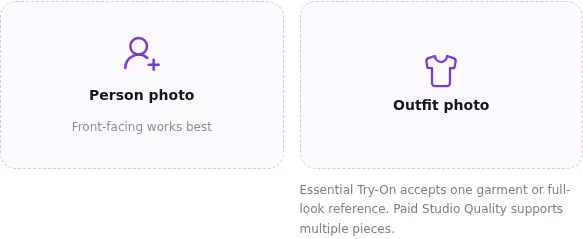
In our October 14 interface test, AIClothSwap displayed 2 upload areas: Person photo and Outfit photo.
AIClothSwap's live virtual try-on interface, captured October 14, 2026, showing the Person photo and Outfit photo upload areas.
Free Preview has no prompt control. Essential Try-On lists one outfit reference and basic prompt control. Studio Quality supports multiple garment references. Use the simpler input for one jacket; consider Studio Quality for several separate pieces.
Tradeoff: the interface check did not establish garment accuracy. Sign-in is required for generation. Start with a fully clothed adult portrait and compare each piece's cut, color, and pattern with its reference.
Other workflows: OutfitAnyone, Pixelcut, Botika, Photoroom, and Canva
OutfitAnyone is a research virtual try-on project. Its official demo documentation says users upload clothing images and choose from preset models; it does not describe uploading your own personal model photo. Check that input difference before choosing it for a portrait swap.
Pixelcut combines image and video creation with product imagery and batch editing. Botika focuses on fashion brands: its documented workflow turns flat lays, hanger photos, or ghost-mannequin images into on-model photography. These are catalog workflows to compare when a one-off personal outfit edit is too narrow.
Photoroom lists virtual try-on, fashion models, clothing recoloring, and batch processing. It is relevant when clothing pictures sit within a broader product-photo workflow. Canva Magic Edit lets you select an area and describe a replacement; its official help uses changing a jacket's color as an example. That fits an edit made inside a design project.
For any of these options, compare the exact input, garment detail, current plan, and downloadable file. A documented feature does not establish better face preservation or output quality than another tool.
Which AI clothes changers are free, and what do paid plans cost?
Free access or trials are advertised by Fotor, Pincel, LightX, iFoto, FitRoom, Magic Hour, and AIClothSwap, with different credit allowances and download conditions.
Competitor prices are in USD, as of October 2026. Annual plans charge for the year. The displayed monthly equivalent does not mean you can pay that amount for just one month. Each tool name links to its pricing page.
| Tool and pricing page | Free access shown | Paid option observed | Billing distinction |
|---|---|---|---|
| Fotor | Basic with limited free credits | Pro: US$47.99/year, displayed as US$3.99/month | Annual billing; 100 credits/month |
| Pincel | Starter trial credits | Creator: US$19/month | 1,000 credits/month |
| LightX | Starter | Pro: US$59.99/year, displayed as US$4.99/month | Annual offer; 1,000 AI credits/month |
| iFoto | Clothes changer advertises free access | Promotional Pro Monthly: US$9.90/month; Weekly: US$4.90/week; Yearly displayed as US$4.95/month equivalent | Annual billing for Yearly; Pro includes HD downloads and logo removal |
| FitRoom | Free plan with a watermark | Standard: US$8/month equivalent, billed yearly | 2,400 credits/year |
| Magic Hour | Free clothes-changer access | Creator: US$144/year, displayed as US$12/month; starter credit pack US$10 | Annual subscription or one-time pack |
| AIClothSwap | Starter; watermarked results; sign-in required | Monthly: 750 credits/month; Yearly: 10,000 credits upfront | One-time credit packs also available |
Budget around images you actually keep. A US$10 purchase that produces two usable edits costs US$5 per usable edit. That is a budgeting example, not a measured result from any tool here. Include discarded attempts in your spending total. A large credit balance alone does not tell you how many usable clothing edits it buys.
For a finished headshot, compare the actual download size and watermark. For a store listing, include the time spent checking the garment against the reference. A lower subscription price offers little value if none of the edits meet your requirements.

Historical outfit illustration from this guide. It shows the kind of change to request, not a same-input comparison between products.
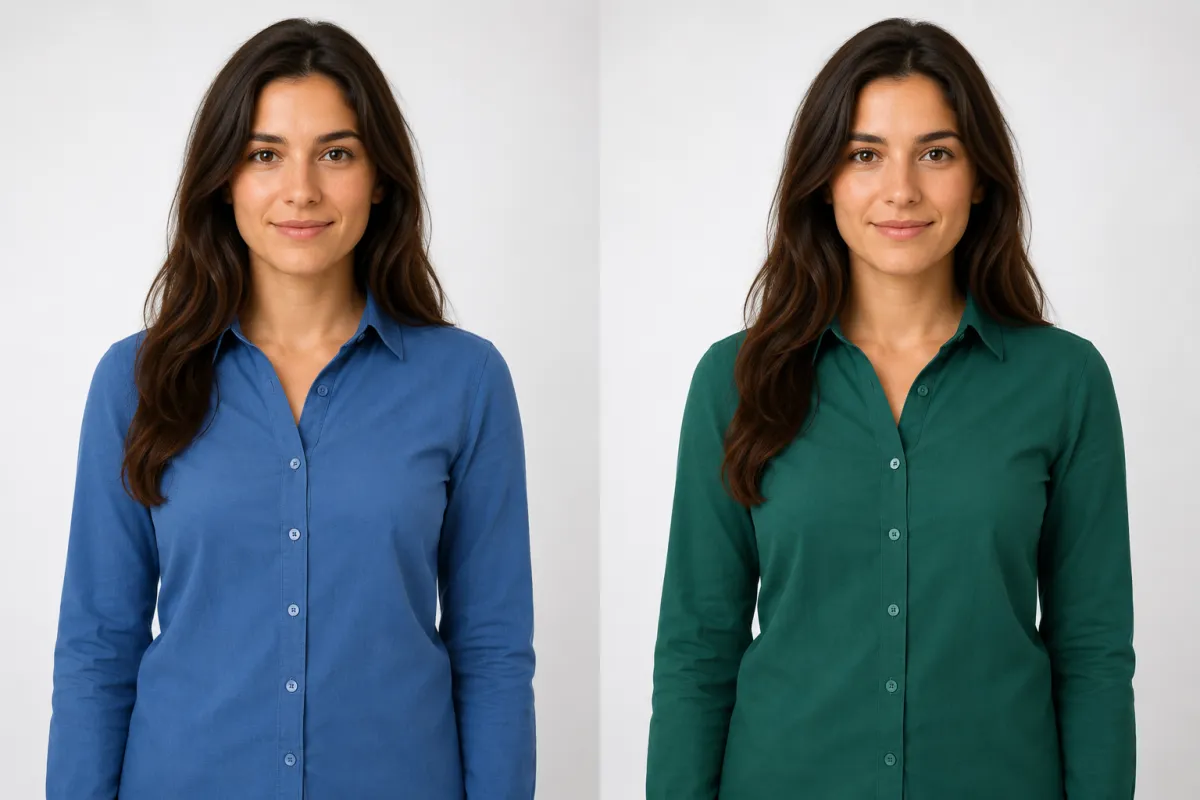
Historical recolor illustration. Inspect the collar, buttons, and seams when checking your own result.
How we compared the clothes changers
The evaluation covered public workflows and plan information, plus a live AIClothSwap interface check; it did not measure comparative generation quality or speed.
We captured AIClothSwap's upload interface on October 14, 2026, and rechecked public tool pages and pricing on October 15. Competitor descriptions come from their linked product pages. Fotor and LightX prices were read from rendered browser pages. iFoto's dated promotional prices come from the pricing evidence retained for our separate iFoto review; the Yearly amount is a monthly equivalent, not a month-to-month charge.
We generated no images for this comparison. We did not run the same photo through all seven tools or compare free and paid results. The selection criteria were input type, editing controls, reusable assets, and billing terms. The labels describe those features; image quality and speed were not measured.
To compare results yourself, use one fictional adult portrait and one garment reference on the same day. Keep the crop and clothing category identical. Record the tier, credit charge, download resolution, and whether you kept the result. For text-only tools, repeat the same description and judge how closely the output follows it.
Check the eyes, jaw, and hairline with the original. Then inspect the neckline, sleeves, closures, and hem against the garment reference. Enlarge the boundary where fabric meets skin or hair. An appealing outfit is useful only if the details needed for your particular job survive.
Best AI clothes changer: FAQs
Choose a clothes changer by the input you have and the detail you need preserved, then compare the usable download and its cost.
Is there an AI that can change your clothes?
Yes. Fotor, Pincel, and Magic Hour document clothing changes in existing photos. Reference-based tools accept a garment picture; prompt-based tools create clothing from a description. Both produce edited images, not physical fitting measurements.
Which AI is best for clothing?
Fotor fits broader photo-editing work, Pincel fits a single garment reference, and LightX fits imagined styles. AIClothSwap's Studio Quality supports multi-piece references. These recommendations concern workflow; no comparative output-quality winner was established here.
What is the best clothes swapping app?
FitRoom is a relevant choice for reusable clothing and model libraries. Magic Hour fits a workflow that continues into video. For one existing garment, choose a reference-based swap and compare the final image against the actual item's details.
Is there a free AI clothes changer?
Yes. LightX, FitRoom, Fotor, Pincel, iFoto, and Magic Hour advertise free access or trials for clothing edits. AIClothSwap lists a Starter plan with sign-in required and watermarked results. Compare download resolution, watermarks, and usage limits before choosing a plan.
AIClothSwap vs Fotor: which should I choose?
Choose Fotor when clothing edits belong in a broader photo-editing workflow. Choose AIClothSwap when separate garment references and its Studio Quality input options match your outfit task. Open the AI garment try-on to compare the available tiers before choosing one.
For related input guidance, read about putting a suit on a photo, AI virtual try-on, and changing clothes color. Use photos you have permission to edit and read the tool's privacy and content policy.
Next step
Bring one portrait and one garment photo to the online outfit try-on. For input help, read how to change clothes in a photo with AI and the best photo for an AI clothes changer.