
Jacket Try-On Online: Preview a Jacket on Your Own Photo
Use a jacket try-on online to compare color, length, lapels, and layers on your photo before shopping. See what an AI preview can and cannot show.
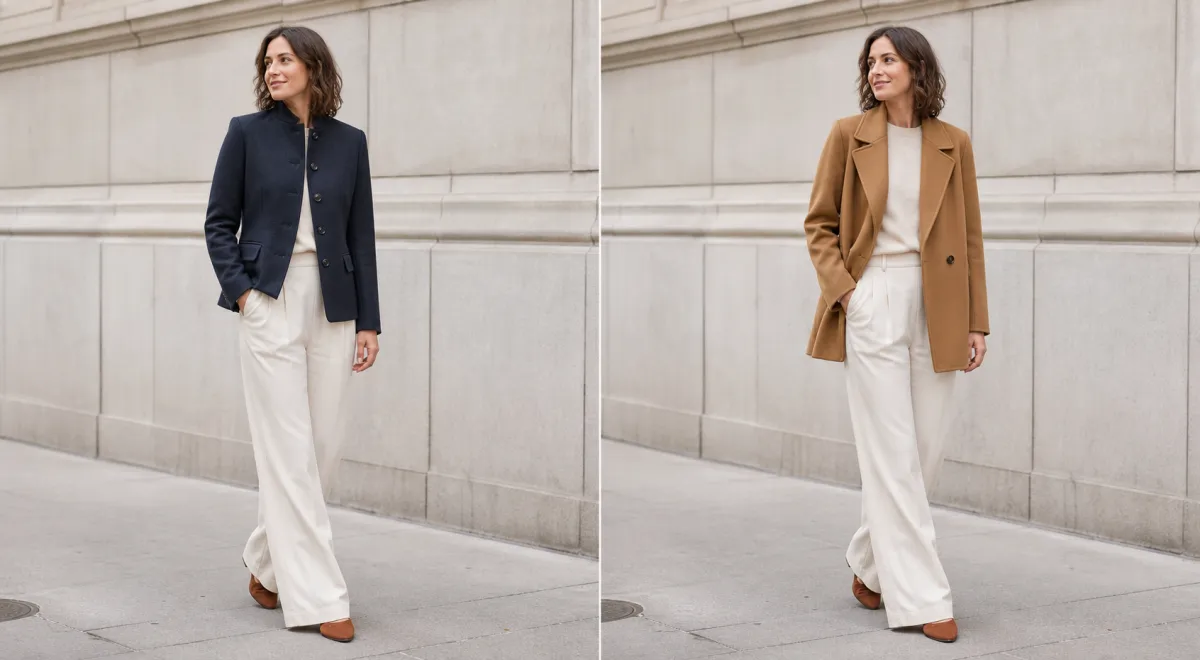
A jacket try-on online is useful when you need to compare a jacket's color, length, lapel shape, or layering effect on your own photo before you narrow a shopping list. AI dress up can make those visual comparisons quickly, but it cannot confirm the real jacket's measurements, warmth, fabric weight, or comfort. Use the preview to choose a direction, then check the actual item.
Last updated: July 21, 2026 · about 8 min read
For a photo-based comparison rather than a store-size recommendation, start with the AI clothes changer and keep the question narrow: which outer layer looks more like the setting you have in mind?
What an AI dress up jacket preview can answer
A jacket does more than add a layer. Its shoulder line changes the outline of a portrait, its length changes the balance with trousers or a skirt, and its color sits close to the face. That makes it easy to choose from a product thumbnail and still dislike the result in a real photo.
Use a jacket preview for visual questions such as:
- Does a cropped jacket make this outfit feel more balanced than a longer one?
- Does camel, navy, charcoal, or black work best with the existing top and background?
- Would a collarless layer, blazer, overshirt, or light bomber fit the setting?
- Does a structured lapel make a headshot feel too formal?
It is not evidence that a particular item will fit. An AI preview cannot measure shoulder width, sleeve length, arm mobility, lining, fabric warmth, or how a jacket changes after sitting down. Keeping that boundary clear makes the comparison more useful, not less.
| Decision | An online preview can help you see | Check on the actual item |
|---|---|---|
| Color | Contrast with your face, top, trousers, and background | The fabric's true shade under your usual light |
| Length | Cropped, hip-length, or longer visual proportion | Where the hem lands when you move |
| Structure | Lapels, collar, shoulder shape, and layering direction | Shoulder room, drape, and sleeve comfort |
| Formality | Whether the outfit reads casual, polished, or businesslike | Whether it suits the real dress code |
Start with a photo that shows the jacket area
Choose a front-facing or three-quarter photo with your shoulders, torso, and at least part of both arms visible. Even light and a clear background make the jacket edges easier to assess. If the original top is hidden by crossed arms, long hair, a bag strap, or another bulky layer, a generated jacket has more gaps to guess.
Keep the comparison controlled. Ask AI dress up to preserve the person, pose, trousers, lighting, and setting while changing only the jacket. For example:
Replace only the outer layer with a hip-length navy wool-blend jacket with a clean single-breasted front and natural lapels. Keep the same person, face, pose, inner top, trousers, lighting, and background. No logo or text.
For the second version, change one variable only. Swap navy for camel, shorten the length, or use a softer unstructured layer. If the pose and scene also change, it becomes hard to tell whether the jacket is actually the part you prefer.
Compare jacket options in three steps
- Name the setting first. A work headshot, a casual dinner, a travel outfit, and a product concept need different levels of structure. Pick the use case before choosing a color.
- Generate the likely option, then one meaningful alternate. Start with the jacket you would genuinely consider. Make the next version answer a specific uncertainty, such as darker versus lighter or cropped versus hip-length.
- Inspect the seams before you decide. Look at the collar, shoulder edge, sleeve ends, hands, hair overlap, and where the jacket meets the inner top. A good thumbnail can hide a broken lapel or an implausible sleeve.
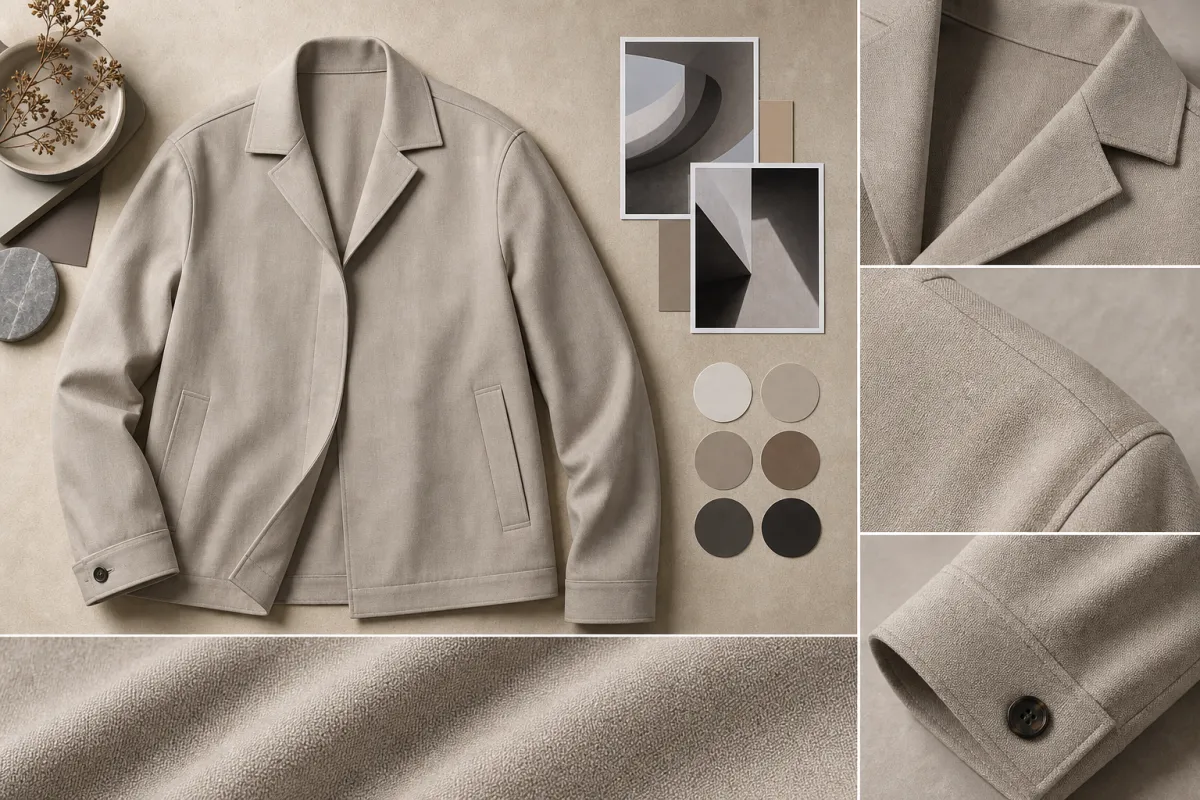
Use a second view to inspect the details that make a jacket preview believable: lapel, shoulder line, sleeves, overlap, and color contrast.
Treat an AI jacket image as a styling comparison, not a fitting-room result. If the choice depends on physical comfort, exact tailoring, or a retailer's return terms, the real garment still decides it.
Choose the right kind of comparison
The most useful preview changes one jacket decision at a time. A light bomber and a tailored blazer can both look good, but they answer different questions. If you need a professional portrait, compare two levels of structure. If you need a casual layer, compare length and color before you introduce accessories or a new background.
| If you are deciding… | Start with this comparison | Avoid assuming |
|---|---|---|
| Whether the jacket suits your photo | One color in two jacket shapes | That the preview proves a real fit |
| Whether a work look feels too formal | Blazer versus softer overshirt | That either option meets a workplace dress code |
| Whether a color works with the rest of the outfit | Keep the same jacket, change only the shade | That screen color matches a retailer's fabric |
| Whether the whole outfit is balanced | Keep the jacket, compare one inner top | That the image validates every garment at once |
If your main question is the garment's shade rather than its shape, use a clothes color changer to keep the jacket itself fixed while you compare colors. If you are choosing among several clothing categories, AI dress up gives you a broader starting point. For outfit ideas before you settle on a garment, the AI outfit generator can help you create a narrower shortlist.
Common mistakes that make a jacket render unhelpful
The usual problem is changing too much in one prompt: a new jacket, new shirt, new hairstyle, new location, dramatic lighting, and accessories. The image may look polished, but it cannot answer whether the jacket was a good choice.
Start with a clean input photo and one jacket direction. Then check these failure points:
- The lapels should sit naturally around the neckline rather than cutting into hair or skin.
- The shoulder line should follow the existing posture, not become wider or sharper without a reason.
- Sleeves and cuffs should end in plausible places around the wrists and hands.
- The jacket color should still work against the original background and inner top.
- The result should not add a brand mark, work uniform, or credential you do not actually have.
If an edge looks wrong, simplify the request or choose a photo with fewer overlaps. A controlled second attempt is usually more informative than adding more design detail.
Use the preview honestly
Only edit a photo you own or have permission to use. A jacket preview can be a practical personal decision aid, a mood-board reference, or an early creative concept. It should not be used to imply that you own a garment, hold a role, or represent a brand when that is not true.
For a purchase, use the preview to eliminate obvious mismatches. Then rely on the retailer's garment measurements, fabric details, reviews, and return policy. For a professional image, choose the version that accurately represents the setting you are going into rather than one that invents a workplace identity.
Frequently asked questions
Can I try on a jacket online with my own photo?
Yes. A jacket try-on online can show how a color, length, collar, or level of structure may look on a clear photo of you. Keep your pose, face, lighting, and background stable so the jacket is the only meaningful change.
Can an AI jacket preview tell me my size?
No. It can help with visual direction, not measurements. It cannot confirm shoulder room, sleeve length, chest fit, fabric weight, comfort, or whether a particular retailer's jacket will fit you.
What photo works best for a jacket try-on online?
Use a well-lit front-facing or three-quarter image with your shoulders, torso, and arms visible. Avoid bulky coats, crossed arms, busy patterns, and objects that hide the jacket area.
What should I check after generating a jacket preview?
Look at the collar, lapels, shoulder seams, sleeves, hands, hair overlap, and the color against the inner top and background. If the jacket is the only change and those details look plausible, the preview can help you choose a real-world option to try.
Related guides
- Try the free AI clothes changer →
- Shirt try-on online: compare a shirt on your photo
- Hoodie try-on online: preview casual layers
- How accurate are AI clothes changers?
Preview a jacket direction before you shop
Use AI dress up to compare a controlled jacket direction on your own photo, then make the final call with the real garment's measurements and details.