Can ChatGPT Change Outfits in Photos? What Works in 2026
Can ChatGPT change outfits in your photos? Here's what GPT-4o image generation (ChatGPT Images) really does in 2026, where it refuses, and the faster way to swap clothes.

Sometimes — but not reliably on a photo of a real person. ChatGPT's GPT-4o image generation (ChatGPT Images) can describe and inpaint outfits, but it often refuses edits to photos of real people and tends to reinterpret the face. For a true outfit swap that keeps your face, pose, and background, a dedicated AI clothes changer is the faster, more dependable route.
Last updated: June 18, 2026 · ~6 min read
Can ChatGPT actually change clothes in a photo?
Let's be fair to the model first. ChatGPT's image engine is genuinely good. The current generator, ChatGPT Images (built on GPT-4o's native image generation and GPT Image 2), launched April 21, 2026 and is available on every plan. You can upload an image, highlight an area, and type something like "change this to a navy blazer." It performs localized inpainting and tries to keep lighting and composition consistent.
The catch is consistency. ChatGPT can be hit-or-miss with photos of real people: it sometimes refuses the edit on identity or safety grounds, and even when it goes through, the model frequently reinterprets facial details — eye shape, jawline, skin tone — so the person no longer looks like themselves.
The honest summary: ChatGPT is excellent at generating new images and editing objects, but it is not built to swap an outfit on a real person while locking their identity. That last part is exactly what a clothes changer is designed for.
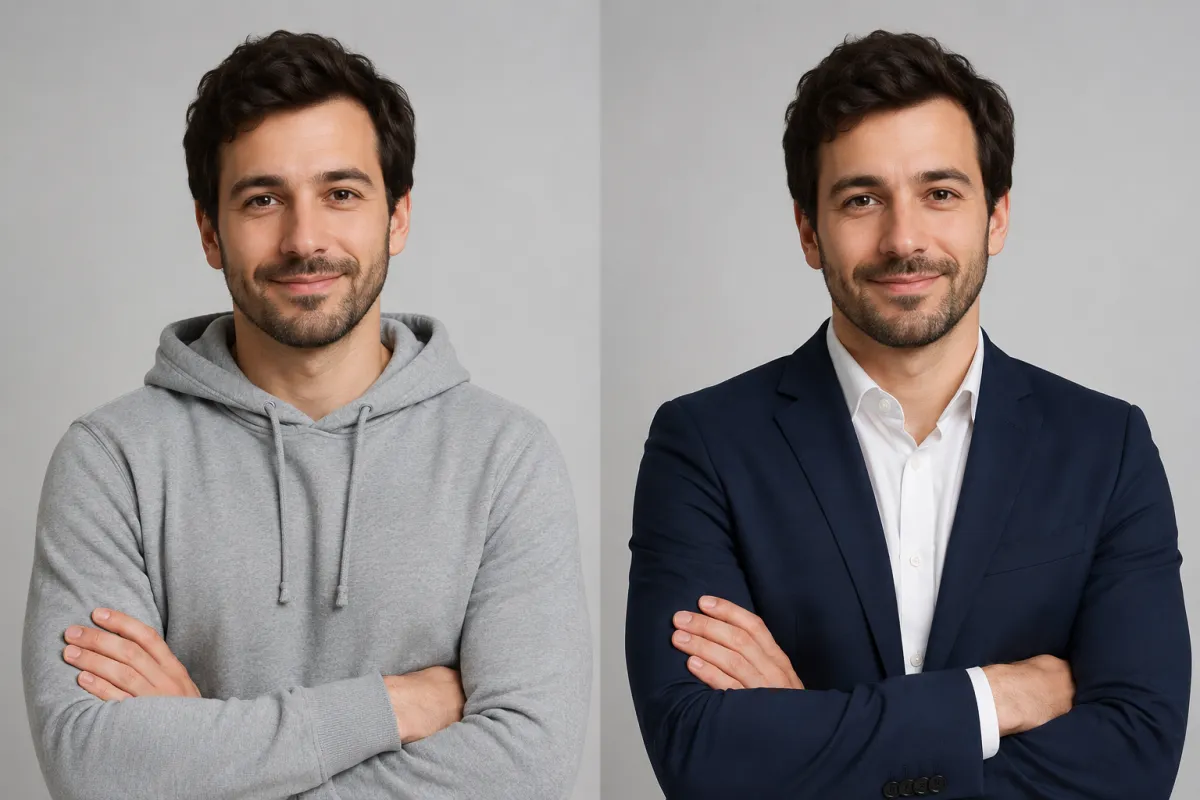
Same photo, same face and pose — only the outfit changes. This is the result a dedicated tool aims for, not a reinterpreted face.
How to change an outfit in 3 steps (the reliable way)
A purpose-built AI clothes changer skips the policy friction and the face-drift problem. The flow is upload → describe → download.
- Upload your photo. A clear, front-facing shot where the clothing is fully visible gives the cleanest swap.
- Mark or describe the new outfit. Brush over the garment, or just type it: "swap the hoodie for a tailored navy blazer over a white shirt."
- Generate and download. The tool keeps your face, pose, and background and re-renders only the clothing. Not perfect? Re-run with a tweaked description — it's non-destructive.
If you want to see it on a specific scenario first, our Graduation Outfit Try-On shows how a single photo becomes a gown-and-cap look without touching the face.
ChatGPT vs. a dedicated AI clothes changer
Both can move pixels around. The difference is what happens to the person.
| Factor | ChatGPT (GPT Image 2 / GPT-4o) | Dedicated AI clothes changer |
|---|---|---|
| Edits a real person's photo | Often refuses or reinterprets the face | Built for it; standard use case |
| Keeps face & identity | Frequently reinterpreted | Locked by design |
| Keeps pose & background | Best-effort, can drift | Preserved |
| Workflow | Prompt, highlight, re-prompt | Upload → describe → download |
| Free use | ~3 images/day, rolling window | Free tries in the browser |
| Paid cost | ChatGPT Plus ~$20/mo | See pricing |
For a different lens on the same comparison — purpose-built try-on tools versus general chatbots — see our AI virtual try-on guide.
Why ChatGPT changes the face (and how to limit it)
When ChatGPT does accept an edit, the most common complaint is that the face came out wrong. The model regenerates regions rather than surgically preserving them, so identity can shift. People work around it with all-caps instructions like "DO NOT alter facial structure, preserve original features." It helps, but it isn't a guarantee — the underlying generator was tuned for creative output, not identity-locked edits.
A specialized tool inverts that priority: it treats the face, pose, and background as fixed and only re-renders the clothing. That's the whole reason we built one. If you want the step-by-step manual-vs-AI breakdown, our how to change clothes in a photo with AI guide walks through it.
Frequently asked questions
Can ChatGPT change the outfit in a photo I upload?
Sometimes, but not reliably for photos of real people. ChatGPT Images can inpaint and restyle clothing on generated or object images, but it often refuses edits to photos that depict an identifiable real person, and tends to alter the face. A dedicated AI clothes changer is built specifically for outfit swaps on real photos.
Is ChatGPT image generation free?
There is a free tier with limited image generation — roughly three images per day on a rolling 24-hour window, depending on demand. ChatGPT Plus is about $20 per month and gives you far higher limits through the latest image model.
Why does ChatGPT change my face when I edit a photo?
Because it regenerates image regions rather than preserving exact pixels, so facial details like eye shape, jawline, or skin tone can drift. Explicit instructions such as "do not alter facial structure" reduce it but don't eliminate it. A clothes changer keeps the face locked by design.
What is ChatGPT Images and GPT-4o image generation?
ChatGPT Images, released in April 2026 and available on all plans, is OpenAI's current in-app image generator, built on GPT-4o's native image generation and GPT Image 2. It improved text rendering, prompt-following, and photorealism over earlier versions.
Is there a faster way to swap an outfit than prompting ChatGPT?
Yes. Instead of writing and re-writing prompts and fighting refusals, a dedicated AI clothes changer follows an upload → describe → download flow and re-renders only the clothing, so you get a usable result in about a minute.
Will a dedicated tool keep my face, pose, and background?
That's the entire point of difference. A purpose-built clothes changer treats your face, pose, and background as fixed and only changes the garment, which is what general chatbots are not optimized to do.
Related guides
Keep exploring before you start editing:
- Try the free AI clothes changer → — upload a photo and swap any outfit on the home page.
- How to change clothes in a photo with AI (no Photoshop)
- AI virtual try-on: how it works and what to expect
- Virtual try-on tool
- Graduation Outfit Try-On
Try it on your own photo
Skip the prompt-and-refuse loop. Upload a photo and change the outfit free → and keep your face, pose, and background exactly as they are.