
Alta App Review: Its Avatar Try-On vs Your Real Photo
Alta is a free AI stylist and closet app. We tested its avatar try-on against a try-on on the original photo.
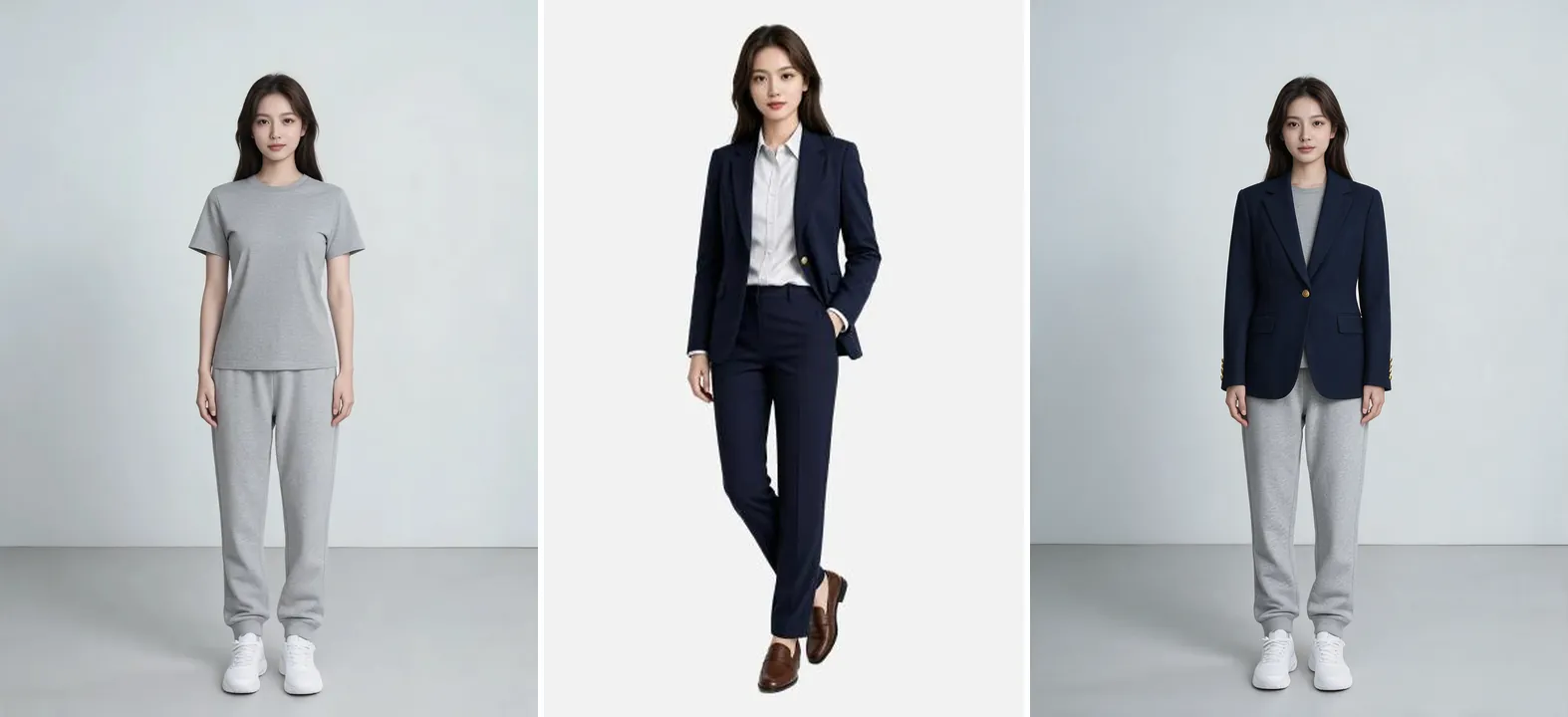
Alta is a free AI stylist and digital-closet app for iPhone, iPad and the web. It organizes your clothes, suggests outfits and dresses an AI avatar of you. In our web test, the try-on took about 30 seconds and showed a newly drawn avatar in a full outfit, not the original photo with one new piece added.
Last updated: November 18, 2026 · ~7 min read
We built an Alta avatar from a test model's photos, added a navy blazer to her Alta closet and tried it on. Then we put the same blazer on her original photo with AIClothSwap's virtual try-on. Here is what each one shows you.
In this guide: what Alta does · is it free? · how the avatar try-on works · avatar vs your photo · which app to use when shopping · try it on your photo
What is the Alta app?
Alta is an AI stylist and digital closet made by Flagship AI, Inc. You add your clothes, and it suggests outfits around them. It runs on iPhone and iPad (App Store) and on the web at altadaily.com. Its App Store description lists these features:
| Feature | What Alta says it does |
|---|---|
| Digital closet | Add items by forwarding email receipts, picking them from Alta's database or taking a photo; it removes backgrounds and fills in details |
| Outfit suggestions | Daily outfits based on the weather and your schedule, or outfits for an event; you can ask Alta to style a specific piece |
| Packing lists | Tell it the destination, activities and luggage size, and it builds a packing list and a travel lookbook |
| Shopping | Points out gaps in your closet, suggests items and alerts you when wishlist pieces go on sale |
| Virtual try-on | Generates the outfit on an avatar that looks like you |
What we saw in our test, side by side with a try-on on the original photo:
| In our test | Alta | AIClothSwap |
|---|---|---|
| What the try-on showed | A new image of an avatar | The blazer on the original photo |
| What we uploaded to start | A face photo and a full-body photo | One full-body photo |
| Pose and background | New pose, white background | Kept from the photo |
| Rest of the outfit | A full outfit with a white shirt, navy trousers and brown loafers | Her own T-shirt, sweatpants and sneakers |
| Timing (hand-timed for Alta) | About 30 seconds after tapping Create Avatar, plus about 20 seconds to build the avatar first | 47 seconds from submitting to the result |
Is the Alta app free?
Yes. Alta's homepage says "Alta is free to use", and the App Store lists Alta Daily as free. We created an avatar, added a garment and ran a try-on on the web without seeing any payment prompt.
AIClothSwap also starts free: 2 watermarked previews before you sign in, 20 Standard credits after your first Google sign-in and 10 more when you check in on later days. Signed-in Standard results have no watermark. The comparison picture below used Studio Quality at 1K (15 credits), which needs paid credits; free credits cover Standard.
How does Alta's virtual try-on work?
This is the route we took in the web app on October 28, 2026:
- Create the avatar. In Edit profile, open Avatar and upload two pictures: a face picture with no one else in it, and a full-body picture from head to feet. Our avatar was ready in about 20 seconds.
- Add the garment. Upload a photo of the item. Alta recognized our blazer as a "Navy Blue Single Breasted Blazer", cleaned up the image and added it to the closet.
- Style it. Open the item and choose "Style this item". Alta builds outfits around it for occasions such as business casual or a party, and suggests other items to complete each one.
- Try it on. Tap Create Avatar under an outfit. About 30 seconds later you see your avatar wearing a full outfit.
How does an Alta avatar compare with a try-on on your own photo?
We used one AI-generated model (not a real customer) in a grey T-shirt and grey sweatpants, and one flat-lay photo of a navy, single-breasted blazer. The two runs had different goals: Alta styled a complete business-casual outfit around the blazer, while AIClothSwap was asked to add only the blazer.
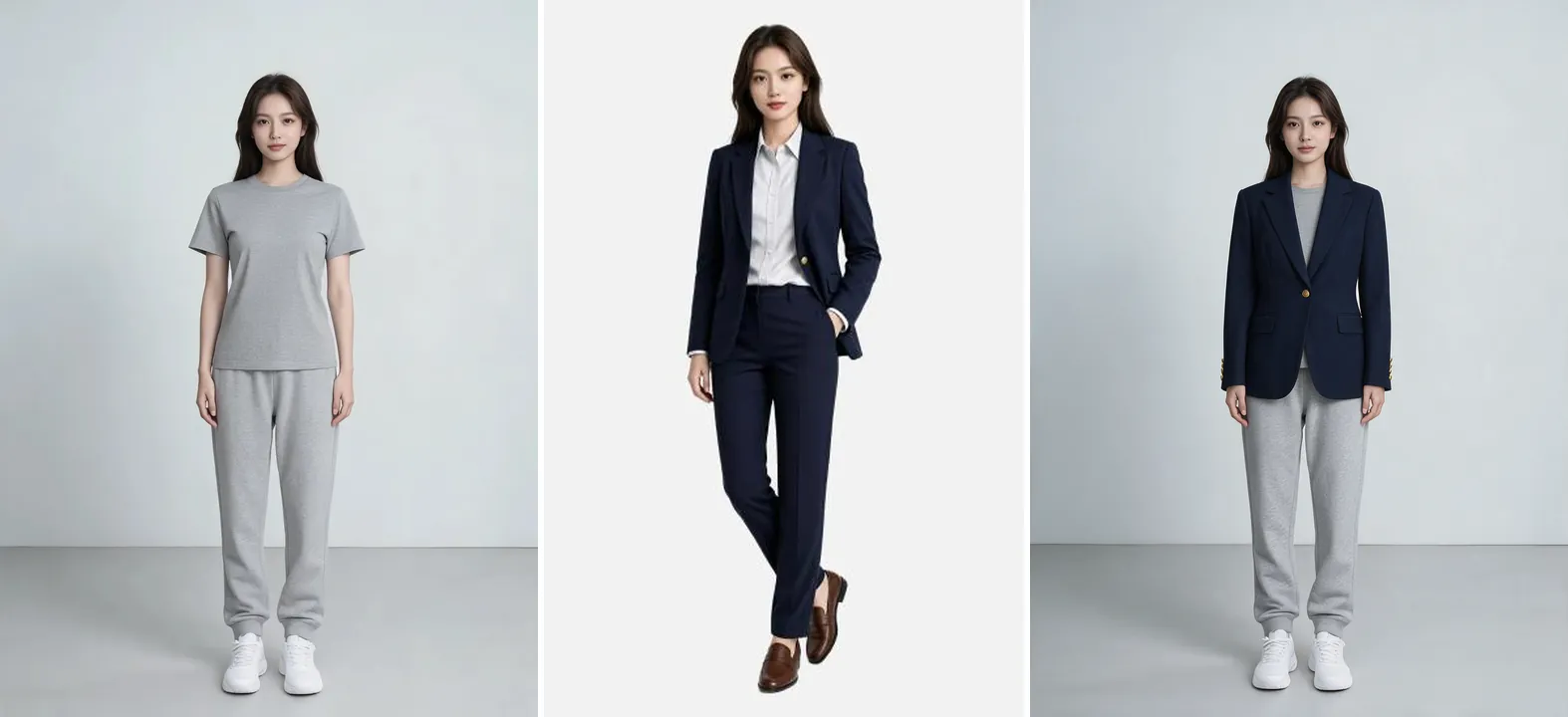
Left to right: the original photo; Alta's "business casual" avatar try-on (screenshot from the web app); AIClothSwap's virtual try-on on the original photo. Alta's result is a new full-body image with a different pose and a white background, wearing the blazer with a white shirt, navy trousers and brown loafers. AIClothSwap kept her photo, pose, grey T-shirt, sweatpants and white sneakers, and added the blazer.
| In our test | Alta | AIClothSwap |
|---|---|---|
| Blazer | Navy, single gold button | Navy, single gold button |
| Her pose | New pose, one hand in a pocket | Same as the photo |
| Background | Plain white | Same as the photo |
| Other clothes | White shirt, navy trousers, brown loafers | Her own T-shirt, sweatpants, sneakers |
If you want to see how a new piece looks with the clothes and the body in your own photo, a try-on on that photo answers it directly. An avatar suits browsing whole-outfit ideas for clothes you already own.
Which app should you use when shopping for clothes?
It depends on the question you're trying to answer:
- "What do I already own, and what's missing?" A closet app like Alta, which tracks your items and points out gaps.
- "How does this exact piece look on me?" A photo try-on like the AIClothSwap virtual try-on, with your own photo and the product photo.
- "Will it fit, and can I return it?" The store's own app or site, for the size chart, stock and return policy.
How can you see clothes on your own photo?
- Take a full-length photo standing straight, in good light.
- Upload it to the virtual try-on with a photo of the garment.
- To try a whole new look, describe it in the AI outfit generator instead.
- Compare the result with your original photo before you buy.
For styling ideas, browse outfit ideas or check does this outfit match?.
A try-on shows how a garment looks on you. It can't check the real fit, so compare the size chart before you order.
Frequently asked questions
Is the Alta app free?
Yes. Alta's website says it is free to use, and the App Store lists it as free. We built an avatar and ran a try-on on the web app without seeing a payment prompt.
Is Alta a legit app?
Yes. Alta Daily is published on the App Store by Flagship AI, Inc. and had a 4.9 rating from 18K ratings when we checked on October 28, 2026. In our test it did what it describes: it built an avatar from two photos and dressed it in a blazer we uploaded.
How does Alta's virtual try-on work?
You add a face photo and a full-body photo to create an avatar, add clothes to your closet, then pick an outfit and tap Create Avatar. Alta generates a full-body image of your avatar wearing the outfit.
Does Alta show clothes on my own photo?
In the web workflow we tested, Alta generated a new avatar image with a new pose and a white background rather than editing the original photo. To see a garment on your actual photo, use a photo try-on such as AIClothSwap's virtual try-on.
What are the best apps for buying clothes?
It depends on the job. A closet app like Alta helps you see what you already own and what is missing; a photo try-on like AIClothSwap shows a specific piece on your own photo before you buy; and the store's own app is where you check sizes, stock and returns.
Can I use Alta on the web?
Yes. We ran the whole test on altadaily.com in a desktop browser. Alta also has an iPhone and iPad app.
Related guides
- Try the free AI clothes changer →
- Virtual try-on
- AI outfit generator
- FASHN AI: pricing and a same-photo test
- Outfit ideas
See the garment on your own photo
Upload one full-length photo, add the piece you're thinking about, and see it with the rest of your outfit. Try the AI clothes changer free.