
Virtual Try-On with AI: See Any Outfit on Yourself Before You Buy
AI virtual try-on lets shoppers and stylists see any outfit on a real photo before buying. How it works, use cases, and how to try it free with AIClothSwap.
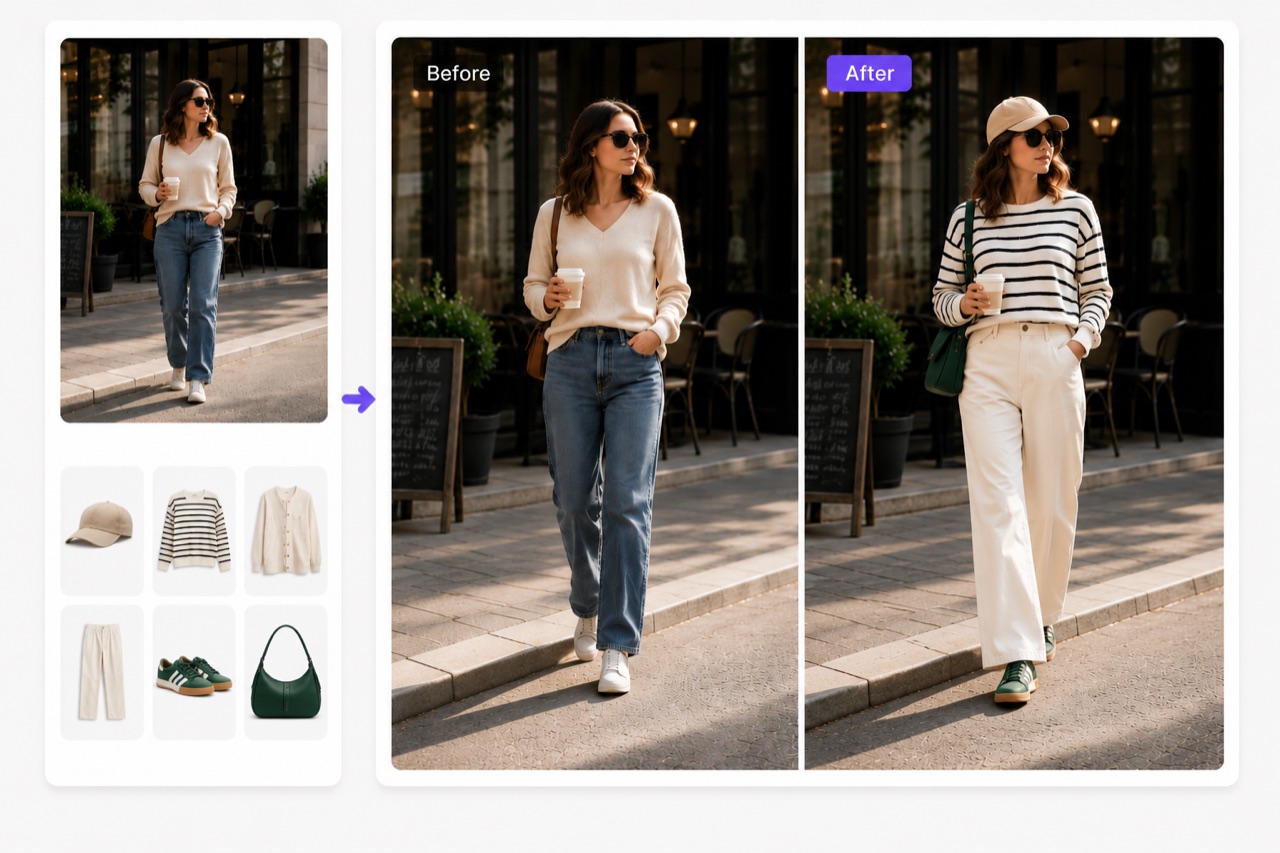
Virtual try-on with AI lets you see an outfit on a real person — yourself, a model, or a customer — before anyone puts on a single garment. Instead of guessing how a jacket will sit or whether a color suits you, you upload a photo, apply the clothing with AI, and look at the result. For shoppers it means fewer returns and more confidence. For stylists and sellers it means a styling session without a studio. Here's how AI virtual try-on works and how to use it well.
What Is AI Virtual Try-On?
AI virtual try-on is the use of generative AI to render clothing onto a photo of a person so you can preview the fit and look. It's the digital answer to the fitting-room mirror — except you can try ten outfits in the time it takes to walk to a fitting room once.
Unlike a flat overlay, a good AI try-on understands the body in the photo. It fits the garment to the actual pose, matches the lighting, and renders fabric the way it would really drape. The goal is a natural-looking preview you can trust enough to make a decision.
Why Virtual Try-On Matters
The clothing industry has a returns problem: a large share of online apparel purchases come back, often because the item didn't look the way the shopper expected. Virtual try-on attacks that gap directly.
- For shoppers: see the outfit on a body that resembles yours before you buy.
- For retailers: reduce returns and give customers a richer, more confident shopping experience.
- For stylists: explore combinations quickly and present options to clients visually.
How to Do a Virtual Try-On with AIClothSwap
AIClothSwap is built around exactly this workflow. Here's how to run a try-on.
1. Start with a base photo
Use a clear, well-lit photo of the person who'll be "wearing" the outfit. A simple standing pose against an uncluttered background gives the AI the cleanest canvas.
2. Add the garment
Upload a reference image of the clothing — a product photo from a store works perfectly — or describe the piece in words. Want to layer a full look? AIClothSwap supports swapping up to six garments at once, so you can try a complete outfit (top, bottom, jacket, and accessories) in a single pass rather than one item at a time.
3. Choose your resolution
Pick 1K for a fast preview, or 2K / 4K when you want editorial-grade detail to share with a client or publish on a product page.
4. Review and iterate
Look at the drape, the proportions, and the color. If something's off, refine your description or swap a different reference image and run it again. Each pass takes seconds.
Use Cases for Shoppers
- Before-you-buy preview: drop a product image onto your own photo to gauge the look.
- Comparison shopping: try the same outfit in two colors side by side.
- Gift confidence: preview how an item might look on the person you're shopping for.
Use Cases for Stylists and Creators
- Client presentations: show a client three full looks built from real garments without booking a shoot.
- Lookbooks and mood boards: assemble cohesive outfit concepts fast.
- Content creation: generate fresh styling content for social channels from a single base photo.
Getting Realistic Results
Virtual try-on is powerful, but a few habits make a big difference:
- Use clean source photos. Even lighting and a clear view of the body produce the most natural results.
- Be specific with descriptions. "Oversized cream linen shirt" beats "nice top."
- Iterate. The best result often comes on the second or third pass, and each one is quick.
Set expectations as editorial-grade rather than a literal photograph. For previewing fit, style, and color combinations, that's exactly the level of realism you need to make a confident decision.
Try It Free
You don't need a subscription to see whether AI virtual try-on fits your workflow. AIClothSwap gives you 20 free credits at signup and 20 more each day, so you can run real try-ons on your own photos right away.