
Change the Background AND the Pose: Describe Your Whole Scene in One Prompt
AIClothSwap changes the outfit, background, and pose from one text prompt. Learn to write scene prompts that turn a snapshot into a styled, editorial-grade shot.
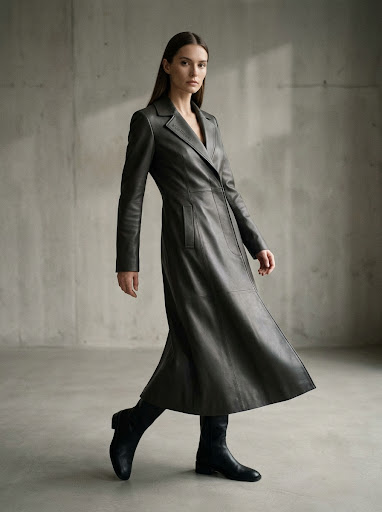
Most AI clothing tools stop at the outfit. You swap a shirt, and the person is still standing in the same room, in the same pose, against the same wall. But a great image is more than a garment — it's the whole scene. AIClothSwap lets you change the outfit, the background, and even the pose, all from a single text prompt. Describe the look you want and the model builds the entire shot. Here's how prompt-driven scene control works and how to use it.
Beyond the Outfit: Why the Whole Scene Matters
A new jacket on someone standing in a cluttered living room still looks like a snapshot. Move that same person to a sunlit street, shift their stance to a confident editorial pose, and suddenly it reads like a campaign. Background and pose carry as much of the "feel" of an image as the clothing itself.
That's why describing your whole scene in one prompt is powerful: you're not editing a photo, you're directing it.
What "Prompt-Driven Background and Pose" Actually Means
With AIClothSwap, your text prompt can do three jobs at once:
- Change the outfit — "a flowing emerald evening gown."
- Change the background — "on a rooftop terrace at golden hour, city skyline behind."
- Change the pose — "turned slightly, looking over the shoulder, relaxed and confident."
Instead of three separate tools and three separate edits, you write one description and the model composes the result — the garment, the setting, and the body language together.
How to Write a Scene Prompt
The quality of your result tracks the clarity of your prompt. A good scene prompt usually covers four things.
1. The outfit
Be specific about garment, color, and material. "Tailored camel wool coat over a black turtleneck" gives the model far more to work with than "a coat."
2. The setting
Describe where the person is and the time of day or light. "In a minimalist concrete studio with soft side lighting" sets a completely different mood than "on a busy autumn street."
3. The pose
Tell the model how the person stands or moves. "Mid-stride, hands in pockets, looking off-camera" reads very differently from "facing forward, arms relaxed."
4. The overall mood
A closing phrase like "editorial fashion campaign, warm and cinematic" helps tie the elements together into a coherent look.
A Worked Example
Say you start with a casual selfie. Your prompt might be:
"A tailored ivory linen suit, standing on a sun-bleached coastal boardwalk at golden hour, three-quarter turn with one hand in the pocket, relaxed editorial pose, warm cinematic lighting."
From one base photo and one prompt, AIClothSwap re-dresses the person, relocates them to the boardwalk, and adjusts their stance — producing a styled scene rather than a retouched snapshot.
Tips for Better Scenes
- Lead with the most important change. If the outfit matters most, describe it first.
- Keep the lighting consistent. Naming a single light direction or time of day helps the whole scene hang together.
- Pick a resolution to match the use. Draft scenes at 1K, then re-render hero shots at 2K or 4K for editorial-grade detail.
- Iterate. Big scene changes sometimes take a couple of passes. Tweak one element of the prompt at a time so you can see what each change does.
Realistic Expectations
Changing the background and pose at the same time as the outfit is ambitious, and the results are natural-looking and editorial-grade rather than a literal photograph. Simpler scene changes render most reliably; very dramatic pose shifts or busy backgrounds may need a more detailed prompt or an extra pass. The payoff is that one photo and one sentence can become a fully styled image.
Combine It with Multi-Garment Swaps
Scene control pairs naturally with AIClothSwap's ability to swap up to six garments at once. You can build a complete head-to-toe look and place it in the exact setting and pose you have in mind — all in one generation.
Try Prompt-Driven Scenes Free
The best way to feel the difference between editing a photo and directing one is to write a scene prompt and watch it render. AIClothSwap gives you 20 free credits at signup and 20 more daily, so you can experiment with outfits, backgrounds, and poses right away.